


1. Installation
OLED installation usually uses 3 ways:
1. Because it is relatively thin, usually double-sided tape or foam tape is glued to the PCB.
2. If the safety requirements are high, you can put a layer of iron frame around the screen, and use the iron frame to press the OLED on the PCB. 3. When making the structure, leave a good OLED card slot.
You can contact our company for specific design, ROHM LCD will provide customers with a suitable installation method.

2. The bending of FPC
The FPC can usually be bent, but it cannot be folded too much. It is often encountered that customers who are designing for the first time fold the FPC at right angles for welding or plugging, resulting in poor contact with the FPC after a period of time, resulting in no display disorder, etc., so When bending-be sure to consider the remaining space.
When assisting customers in development, there will be many similar detailed problems. ROHM LCD has been specialized in producing LCD screens for many years, and will inform customers of the points of attention in every detail to ensure that customers will not repeat development for similar problems.
3. Power
The OLED screen requires two working voltages, VDD and VCC (or VPP). Among them VDD is the working voltage of IC logic part, usually 2.8~3.3V.
vCC (or VPP) is a backlight voltage similar to LCD, used to light up pixels.
In the shutdown or standby state, it is necessary to ensure that VCC (or VPP) is 0, otherwise it may generate mA-level leakage current.
In particular, it should be noted that when using a DCDC structure similar to the figure below to obtain VCC (or VPP)), the CE terminal of the DCDC chip cannot actually make the output 0, and the closing of the CE terminal can only make the output VOUT=VIN. The power supply needs to be turned off before VIN.

4. CROSSTALK
Since the passive OLED is driven by the row scanning voltage, when the number of pixels lit by the row and the row is relatively large, some rows will be brighter and some rows will be darker.
There are 2 ways to solve this problem:
1. When designing patterns, try to use white letters on a black background, which will effectively alleviate them.
2. If you really want to use it, you can try to reduce the screen brightness (reduce the value of the brightness register) to adjust the visual effect.
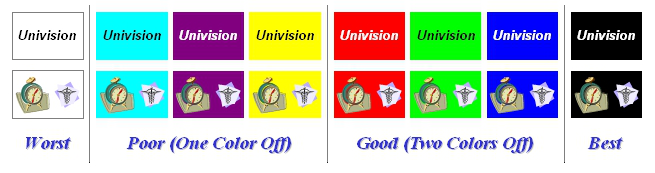
For color screens, CROSSTALK is more likely to appear due to the relatively rich patterns. The design principle is also based on dark background. Specifically, it is the display effect: turn off all three colors of background color RGB>turn off two colors in RGB>turn off one color in RGB.
5. Burn screen
Long-term display of a fixed picture may cause image retention (also known as burn-in). Solution: Set up a screen saver to keep the display content changing.





